
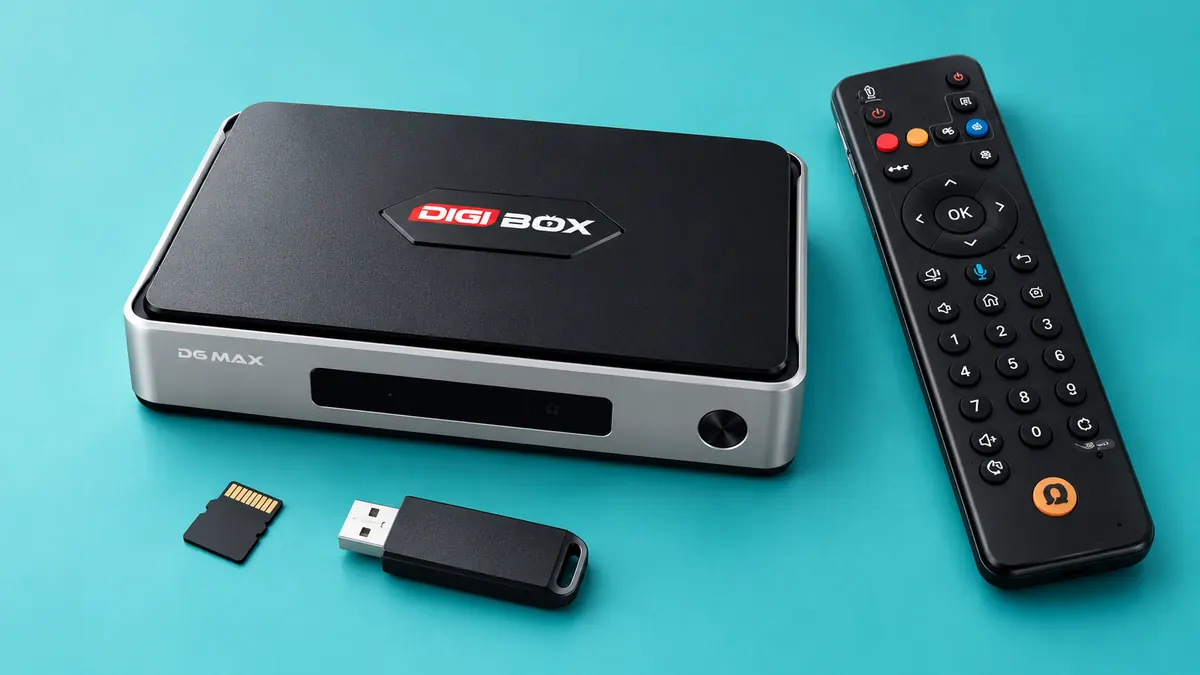
The DIGIBOX authorized retailer lists a DIGIBOX D6 MAX MicroSD slot and four USB 2.0 ports. If you want a removable place for personal photos or videos, which connection makes more sense? The answer depends on how often you move files, how visible you want the accessory to be, and what your own storage device can reliably read.
The DIGIBOX D6 MAX product specifications confirm the ports and 64GB of built-in eMMC storage. They do not publish a verified maximum MicroSD capacity or a promise that every file system, USB drive, card, or app works. Use this comparison as a decision guide, then test the actual accessory before committing a large media collection.

DIGIBOX D6 MAX MicroSD or USB: the choice in one glance
| If your priority is… | Try first | Why |
|---|---|---|
| A small, low-profile accessory | MicroSD card | It can stay less visible once inserted, if recognized by the device. |
| Frequent transfers from a laptop | USB flash drive | The connector is often easier to handle than a tiny loose card. |
| Moving a drive between several devices | Whichever all devices can read | A compatible file system and dependable file copy matter more than the shape. |
| More room for apps | Check internal storage first | Neither removable option guarantees that an app can move its data. |
This is about keeping personal files separate from the box’s internal system space. If the number “64GB” is confusing, the DIGIBOX D6 MAX RAM and storage explainer distinguishes built-in storage from working memory and removable media.
MicroSD: discreet, but easy to lose
A MicroSD card is physically small. That can be convenient for a tidy TV setup: there is no flash drive projecting from a USB port. It is also easy to misplace during file transfers, and some computers need a separate card reader. Before buying, confirm that your computer can write to the card and that the box recognizes a modest test card. The product page identifies a MicroSD slot, but it does not specify a supported maximum capacity or card speed.
If you use a card, label its storage case and keep a second copy of important files. Do not force the card into a port because a product photo appears to show a particular orientation. Follow the marking on your actual DIGIBOX D6 MAX unit. Power down before changing removable storage unless the current software provides an explicit safe-eject option.

USB flash drive: simpler handling, visible hardware
A standard USB flash drive is often easier to plug into a laptop, copy files to, and identify in a drawer. The DIGIBOX D6 MAX lists four USB 2.0 ports, giving you a physical storage connection without an additional card reader at the TV end. The tradeoff is that a drive can protrude from the box and may be bumped in a tight cabinet. Check cable clearance and ventilation when choosing its location.
The USB-C connector on the product listing is the 5V/2A power input. Do not assume it is a general storage port. For a detailed guide to watching your own files without internet, read the existing DIGIBOX D6 MAX USB and MicroSD playback guide. That article covers the viewing workflow; this one is about which physical medium fits your routine.
Avoid the speed-number trap
A card advertised with a high speed rating or a flash drive sold as “fast” may still be limited by the device connection, file format, playback app, or quality of the media itself. The DIGIBOX D6 MAX specification states USB 2.0 ports; it does not provide measured card-slot performance or a benchmark for a particular accessory. Do not promise faster streaming because you bought removable storage. Live streaming depends on the network and the viewing service.
If the goal is to fix a nearly full box, first look at what occupies the built-in storage. The DIGIBOX D6 MAX storage-full checklist separates app data, cache, downloads, and personal media. A card or drive may be useful for your own files, but it is not a universal replacement for internal app storage.

A five-minute compatibility trial beats guesswork
- Back up the original photos or videos on another device before testing.
- Copy one photo, one short video, and one music file you own to the card or USB drive.
- Safely eject it from the computer, connect it to the appropriate DIGIBOX D6 MAX port, and look for it in a compatible file app.
- Open each sample file. If only one fails, investigate its format or playback app before replacing the storage device.
- Copy a file back to the computer and confirm it opens there too. Keep the originals backed up.
This trial tests the whole route: the storage device, file system, copied file, television app, and box. It is more reliable than assuming that a large advertised capacity will automatically work. If you need to install a compatible file app, the DIGIBOX app installation guide explains supported sources and why an app’s behavior may vary by version.
Which one fits your household?
Choose MicroSD when you want a less visible removable medium and can comfortably manage a small card. Choose a USB flash drive when you transfer files often or want something easier to handle. Either way, buy for a verified need: a family photo folder, home videos, or a portable music collection. Keep the box’s included storage for its system and apps, and keep your only copies somewhere more dependable than one removable accessory.
If your real goal is a one-night photo slideshow during a trip, the DIGIBOX D6 MAX travel guide covers the separate HDMI, power, and connectivity checks. A storage choice alone cannot solve those travel setup questions.
Quick questions before buying storage
Is a MicroSD card included with DIGIBOX D6 MAX?
The current product listing does not name a MicroSD card in the original package or promotional extras. Treat it as a separate purchase unless the live offer changes.
Can either accessory store every installed app?
No such universal support is promised. App storage behavior depends on the Android system and the individual app.
Is a USB drive always faster than MicroSD?
Not necessarily. The site does not publish a comparative benchmark. Judge by the files and transfer routine you actually use.
Will either one play every video?
No. The file, encoding, playback app, and display path all matter. Test a short known-good sample.
Can removable storage replace a backup?
No. Keep an additional copy of irreplaceable photos and videos on another trusted device or backup service.
Start with the box and a small test set
The DIGIBOX store overview has current retailer information and support options.
Check the live DIGIBOX D6 MAX hardware listing for the connections and package before buying an extra storage accessory. A small tested drive or card is more useful than a large unverified one.
Use code DG5 for 5% off the DIGIBOX D6 MAX at checkout, and confirm the reduction in the order total.