
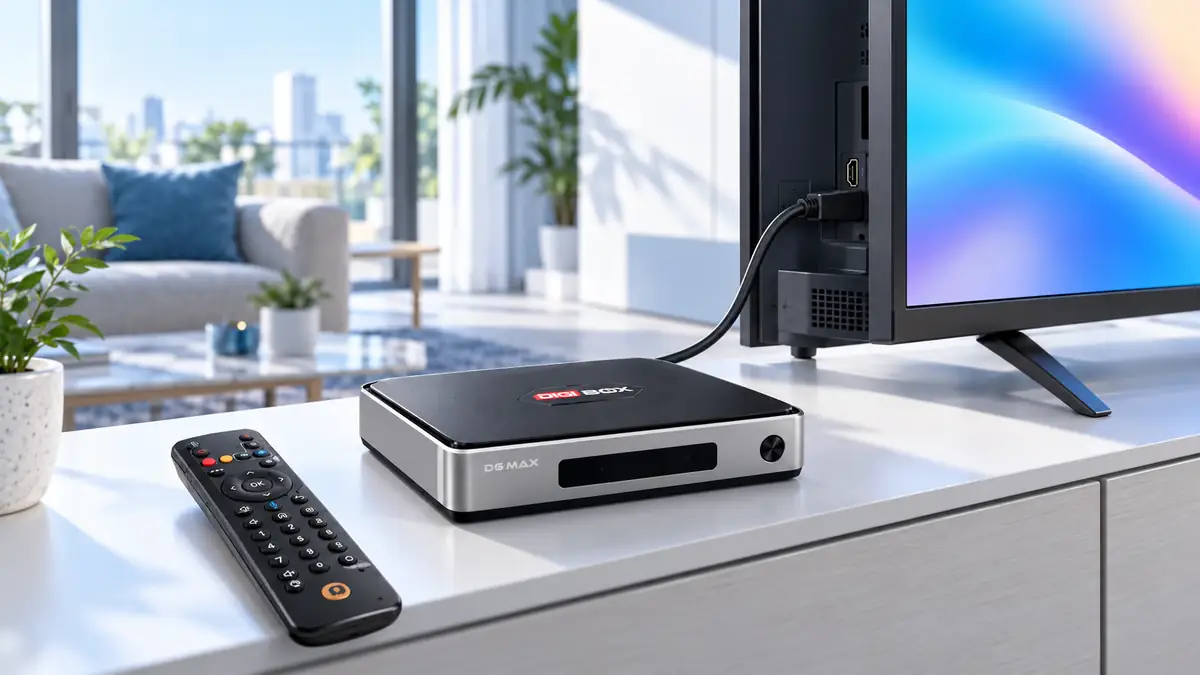
What is a smart TV box? It is a small computer that connects to a television or another compatible display, usually through HDMI, and adds an interface for apps, online media, and local files. The screen still supplies the picture and sound; the external box supplies the software and connections. The DIGIBOX entertainment range is one example of this approach.
The DIGIBOX D6 MAX TV box makes the concept concrete: it combines Android 12, 4GB RAM, 64GB eMMC storage, Wi-Fi 6, Gigabit Ethernet, Bluetooth 5.4, and a voice Air Mouse remote. Those parts affect how you connect, navigate, and store apps. They do not guarantee that every outside streaming service or title is available.
A smart TV box is the middle layer between your screen and content
Picture three layers. First is the display: a television, monitor, or projector with a suitable HDMI input. Second is the box: its processor, operating system, network connection, storage, and remote. Third is the viewing source: a built-in app, a compatible installed app, or a personal media file. A problem in any layer can change the result. A screen on the wrong HDMI input looks like a box failure; weak internet can look like a slow device.
Unlike a cable receiver, a smart TV box does not necessarily arrive with a fixed list of cable channels. DIGIBOX’s built-in apps provide a broad range of news, sports, series, movies, documentaries, and animation, but specific programs and regional access can change. The introduction to DIGIBOX explains the brand and device in more detail if that is your next question.
What changes when you add one to a television?
On a compatible screen, the box becomes an additional input. Select that HDMI source with the TV remote, power the box with its specified adapter, and connect the box to the network. You then use the box’s own remote for its interface. A working television does not need to be replaced simply because its built-in software is old or limited.
That distinction matters for older sets. The older-TV upgrade guide shows what an HDMI-connected DIGIBOX can add while keeping the same display. A non-HDMI screen may need an active converter sold separately, and converter compatibility is not guaranteed. Check the actual ports on the back of the TV before buying anything.
| Part of the setup | What it does | What to verify |
|---|---|---|
| TV or projector | Shows video and plays sound | Available HDMI input and compatible display settings |
| Smart TV box | Runs the interface, compatible apps, and local media | Current model specifications and power requirements |
| Network | Connects online apps and live media | Wi-Fi signal or an Ethernet cable route |
| Viewing service | Supplies its own programs and account rules | Current availability, region, and any separate fee |
Inside the box: memory, storage, and connections
Memory and storage are often mixed up in product listings. RAM helps the system keep active tasks responsive; storage holds the operating system, compatible apps, and files. The DIGIBOX D6 MAX currently lists 4GB DDR3 RAM and 64GB eMMC storage. These figures are useful when comparing devices, but they do not by themselves predict how every app will behave. The RAM and storage explainer turns the numbers into household decisions.
Connectivity gives you choices. DIGIBOX D6 MAX lists dual-band Wi-Fi 6 and Gigabit Ethernet. Wi-Fi keeps the room tidy when the signal is reliable; Ethernet is useful when you can run a cable and want a more predictable network path. Bluetooth 5.4 supports compatible accessories such as headphones and input devices, subject to each accessory’s own requirements.

Why picture quality is more than an 8K label
The product page lists H.265 decoding up to 4K at 60 frames per second and 8K at 24 frames per second. Decoding support is a hardware capability; it does not mean that every app, program, cable, or television will produce 8K playback. The source video, app, display, HDMI path, and internet connection all have a say. If your TV is 4K, an “8K” label on a box is not a reason to expect an 8K picture from that screen.
For a more careful reading of those numbers, see the DIGIBOX 4K versus 8K explanation. It helps you separate an advertised decoder specification from the picture you will actually see at home.

Built-in apps and outside subscriptions are separate decisions
DIGIBOX’s built-in apps are a reason many households consider the device: they offer a range of programming categories without a mandatory DIGIBOX monthly hardware subscription. That is different from saying every outside service is included at no cost. A third-party streaming provider may require its own account, subscription, regional eligibility, or compatible app version.
If a named outside app is the entire reason for buying, check its current support before making that promise to someone else. The Netflix, Prime Video, and Disney+ compatibility guide explains why app availability and playback terms deserve a separate look.
The internet connection is another separate cost and quality factor. The Wi-Fi versus Ethernet guide can help you choose a connection path based on your room rather than on the box’s advertised maximum network speed.
Who benefits from a separate smart TV box?
A separate box can suit someone who likes their current TV picture but wants a different interface, more connection options, or the DIGIBOX viewing environment. It may also help a household that shares one screen across languages and types of content. It is less useful when a buyer cannot confirm a compatible display, suitable power, or stable internet for the features they expect.
Use the device as a practical addition to the television, not as a magic replacement for every service and network requirement. That framing makes it easier to choose the right equipment and to ask sensible questions before ordering.

Smart TV box questions, answered
Does a smart TV box replace my television?
No. It uses the existing compatible TV, monitor, or projector as a display, normally through HDMI.
Does DIGIBOX D6 MAX need internet?
Internet is needed for online apps, live streams, and updates. Some compatible local media may work offline, depending on its format and storage location.
Is a monthly DIGIBOX subscription required?
No mandatory DIGIBOX monthly subscription is required simply to own the box. Internet and optional third-party services may charge separately.
Will it turn any old television into a smart TV?
It works most directly with a compatible HDMI display. Older non-HDMI sets may need an active converter, which is a separate purchase with uncertain compatibility.
Are all Android TV boxes the same?
No. Hardware, operating system version, ports, remotes, software, retailer support, and third-party app compatibility vary by model. Compare the exact product listing rather than a generic “Android TV box” label.
The simple decision
A smart TV box adds a separate computer and viewing interface to a screen you already own. If that is the missing piece in your living room, the DIGIBOX official website has the current retailer and support information.
Compare the DIGIBOX D6 MAX specifications and included items with your TV’s ports, home network, and must-have viewing choices before ordering.
Use code DG5 at checkout for 5% off DIGIBOX D6 MAX.