
DIGIBOX D6 MAX voice search can spare you the small chore of typing a film title with a TV remote. It gives you another way to start looking, provided the remote, connection, and current app all cooperate. The DIGIBOX TV box range is built for living-room use, where a simple remote should feel more natural than a keyboard.
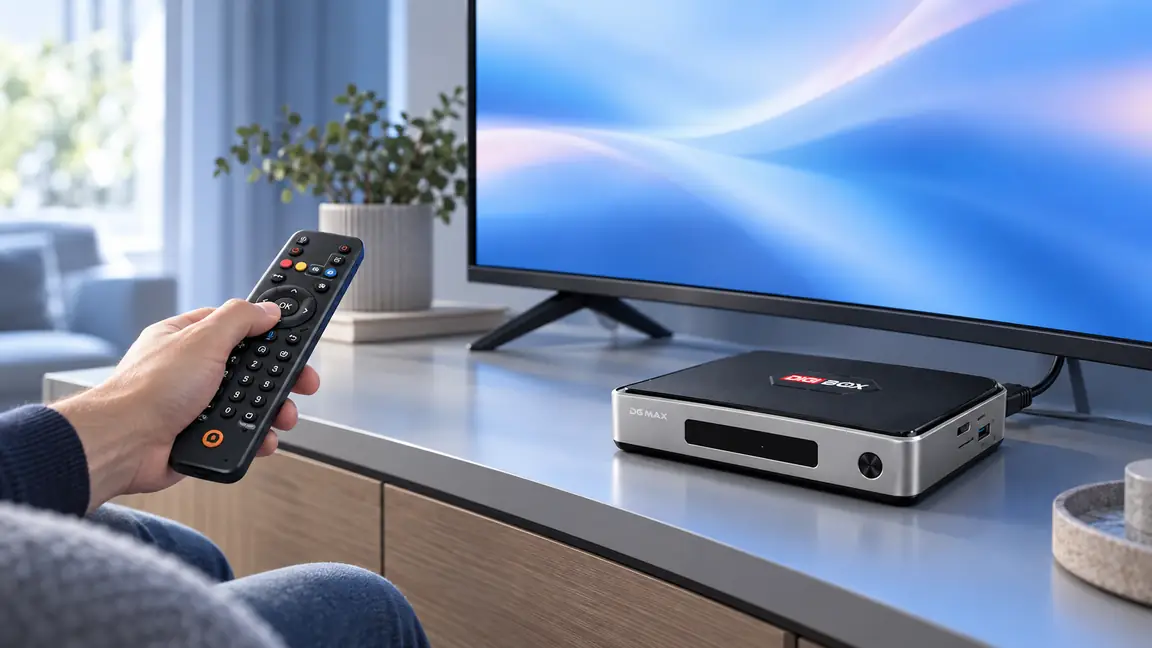
The DIGIBOX D6 MAX with its voice Air Mouse remote is the model discussed here. Its microphone button can save time when you know what you want to find. This guide shows a sensible first test, explains where voice results may vary, and gives you a quick way to diagnose silence or wrong results without promising that every app has the same voice-search behavior.

DIGIBOX D6 MAX voice search: start with a ten-second test
Turn on the television, select the HDMI input used by DIGIBOX D6 MAX, and wait for the home screen. Confirm that the arrow and OK buttons work. Then highlight a search field or the interface area where search is available, hold the microphone button on the remote, speak one short phrase at a normal volume, and release. Try a familiar movie title or a simple category such as “documentaries.” If the interface shows your words or relevant results, the basic path works.
If nothing happens, test a regular remote button before changing settings. A remote that cannot move the selection has a different problem from a microphone that hears you but returns the wrong title. The DIGIBOX D6 MAX remote-pairing guide explains the first case in detail.

What voice search does—and what it does not do
DIGIBOX D6 MAX voice search helps you enter a request. It does not guarantee that one search reaches every built-in channel, every installed app, or every paid catalog. A result can depend on which screen is open, the app’s own search support, language settings, regional availability, and an active internet connection. If you say a program name and see no result, try the same name inside the app you intend to use before concluding that the remote failed.
DIGIBOX offers built-in viewing options across news, sports, series, movies, documentaries, and animation. When your goal is to browse rather than find one exact title, the DIGIBOX D6 MAX content guide is a better next stop than guessing that voice search has a universal channel index. Exact lineups and programs can change.
A practical search routine for the whole household
- Say a short, distinct title first. If several titles sound similar, add a year or an actor only if the current search screen supports it.
- Search within the app you want to watch in when a general search returns mixed results.
- Use the arrow and OK buttons to inspect the result before opening it; a spoken match is not proof of the right program.
- Keep the remote close to your mouth, reduce background TV volume briefly, and speak at an even pace.
- For family members who prefer their own language, test one phrase in that language and check which input or app settings are available.
These habits are especially useful when setting up a household for someone who dislikes on-screen typing. The guide to DIGIBOX D6 MAX for elderly parents offers other small changes that can make daily use calmer.
When the microphone seems to do nothing
Work from the visible symptom. If no remote buttons respond, check the batteries and pairing first. If buttons work but the voice button does not bring up a prompt, try from the home screen and then from a search field in a compatible app. If your words appear but results never load, test whether other online features work; voice recognition and search results can need internet access. The DIGIBOX D6 MAX Wi-Fi diagnosis separates connection problems from app problems.
| You see | Most useful next check |
|---|---|
| No response from any button | Batteries, power, and remote pairing |
| Navigation works; microphone does not | Search screen, remote pairing, and app support |
| Words appear; results do not load | Network connection and the current app |
| Results are unrelated | Shorter phrase, language, and app-specific search |
Do not factory-reset the box just because DIGIBOX D6 MAX voice search does not return a spoken title in one app. Test another search surface first. If a newly installed app behaves differently from built-in viewing options, the DIGIBOX D6 MAX app guide explains why app source and compatibility matter.
The hardware still matters when you are shopping
DIGIBOX D6 MAX voice search is one convenience among several. The box also lists 4GB RAM, 64GB storage, Wi-Fi 6, Gigabit Ethernet, and HDMI connectivity. Those features support an everyday living-room setup, but none of them guarantees a particular voice command or a particular stream. Consider the remote alongside your TV inputs, internet connection, and the content your household actually watches.

Voice-search questions buyers often ask
Does DIGIBOX D6 MAX include a voice remote?
The current DIGIBOX D6 MAX listing describes a voice Air Mouse remote. Check the current product package for the exact accessories included with an order.
Can I search every app with one voice command?
Do not assume that. Search behavior depends on the screen and the app. Test the search function in the app you plan to use.
Does DIGIBOX D6 MAX voice search work without internet?
Some local remote buttons still work offline, but voice recognition or online results can require a working connection. Test again after reconnecting.
What if my accent or language is misunderstood?
Try a shorter phrase, a different pronunciation, or the app’s own search field. Check the available language settings rather than assuming every app recognizes every language.
Will voice search fix a remote that is not paired?
No. If the arrow and OK buttons also fail, start with batteries and pairing before troubleshooting the microphone.
Make everyday control simpler
For current support and shopping details, return to the DIGIBOX official store.
Compare the full DIGIBOX D6 MAX product details with your TV and household needs. At checkout, use code DG5 for 5% off the box; the store currently lists this coupon as active.