
If you’re considering buying a DIGIBOX D6 MAX, one of the most important questions probably isn’t about RAM, storage, or processor specifications.
It’s much simpler:
What can you watch on DIGIBOX?
For most buyers, that matters more than what’s printed on the specification sheet.
A TV box sits in your living room because you want to use it for entertainment—live viewing, movies, TV shows, family content, YouTube, music, kids’ programs, and other apps. Before searching for a DIGIBOX channel list and content, it’s important to understand what the DIGI BOX D6 MAX actually is.
It is an Android-based entertainment platform rather than a TV box with one permanently fixed list of channels. Let’s look at what that means in everyday use.
What Is the DIGIBOX D6 MAX?
The DIGIBOX D6 MAX is the current premium DIGIBOX TV Box designed to connect to a television through HDMI. Its core specifications include:
- Android 12
- Quad-core ARM Cortex-A53 CPU
- 4GB DDR3 RAM
- 64GB eMMC storage
- Dual-band Wi-Fi 6
- 2T2R antenna
- Gigabit Ethernet
- Bluetooth 5.4
- Bluetooth voice remote
- H.265 video decoding
- 4K @ 60fps / 8K @ 24fps decoding support
These specifications give the D6 MAX the hardware foundation for everyday streaming, Android apps, and media playback.
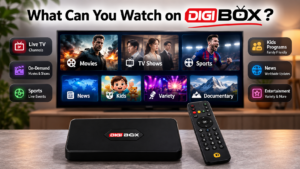
Live TV Content
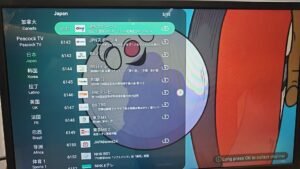
Live viewing is one of the first things people search for when researching a DIGIBOX. You may see searches such as:
- DIGIBOX channels
- DIGIBOX channel list
- What channels are on DIGIBOX?
A DIGIBOX can provide categories such as:
- News
- Entertainment
- Lifestyle
- Family programming
- Regional content
- International programming
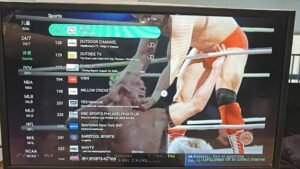
- Sports-related content

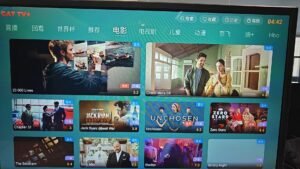
Movies
Movies are another major use case for the DIGIBOX D6 MAX. Through compatible apps and services, users can access movie libraries available in their region. This can include different genres such as:
- Action
- Comedy
- Drama
- Romance
- Thriller
- Documentary
- Family
- Animation
The 64GB internal storage also gives the Android system space for compatible apps, updates, and temporary data. For a family that wants one entertainment device connected to the main television, this makes the D6 MAX useful beyond live viewing alone.
TV Shows and Series
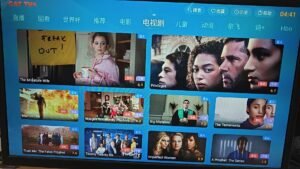
Many people use their TV box more often for series than for traditional scheduled television. With compatible DIGIBOX apps, the DIGIBOX D6 MAX can serve as a central device for accessing the TV and streaming services you already use.
For example, a household may have:
- Parents watching dramas
- Children using family apps
- Younger adults watching English-language shows
- Everyone sharing YouTube
That’s one reason an Android TV box can make sense for a multi-generation household.
YouTube and Online Video
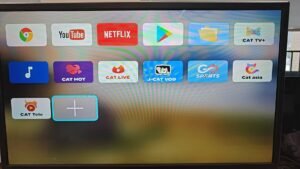
YouTube is one of the most useful applications on a large-screen TV. Depending on current app compatibility, users can use online video services for:
- Entertainment
- News
- Tutorials
- Podcasts
- Travel
- Food
- Technology
- Music
- Exercise
- Education
This is also where DIGIBOX can be useful for people who don’t watch traditional television very often. Instead of switching between a phone, tablet, and TV, a TV box moves more of that online video experience onto the living-room screen.
Sports Content
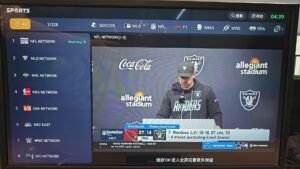
Sports fans can use compatible sports applications and services that are officially available in their location. Depending on your country and subscriptions, these may cover categories such as:
- Basketball
- Football
- Soccer
- Baseball
- Tennis
- Motorsports
- Combat sports
- Other live sporting events
However, buying a DIGIBOX doesn’t automatically give you a subscription to every sports service. If a sports platform normally requires a paid account, you’ll still need the appropriate subscription.
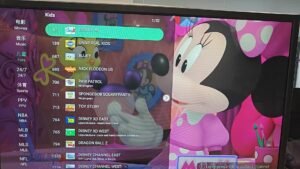
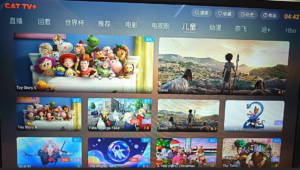
Kids and Family Content
A TV box isn’t only for adults. The DIGIBOX D6 MAX boasts Kids Lock as one of its built-in features. Families can also use compatible kids and educational apps for:
- Cartoons
- Children’s stories
- Educational videos
- Language learning
- Music
- Family entertainment
Parents should still use the parental controls available in individual apps and choose content appropriate for the child’s age. For bilingual and multilingual households, educational video apps can also make the television part of a child’s language-learning environment.
Music and Karaoke
Your television can also become a home music screen. Compatible Android music and karaoke apps can be used for:
- Music videos
- Playlists
- Concerts
- Background music
- Karaoke
- Family parties
Bluetooth 5.4 support also expands the D6 MAX’s connectivity options for compatible accessories.
Local Media
Streaming isn’t the only way to use a TV box. The DIGIBOX TV box provides multiple USB ports, so compatible local media and peripherals can be connected depending on file format and app support.
That can be useful if you already have your own collection of:
- Family videos
- Photos
- Music
- Compatible video files
This is particularly helpful when internet access isn’t ideal or when you want to view personal media on a larger display.
4K and High-Resolution Video
The DIGIBOX D6 MAX’s published specification lists H.265 decoding with support for 4K at 60 fps and 8K at 24 fps. That doesn’t mean every video you watch will be 8K. Actual picture quality depends on several things: Source Content → App → Internet Connection → DIGIBOX → HDMI → Television
If the original content is 1080p, an 8K-capable decoder doesn’t magically turn that source into native 8K footage. The hardware specification simply tells you what the device’s decoding platform is designed to support under compatible conditions.
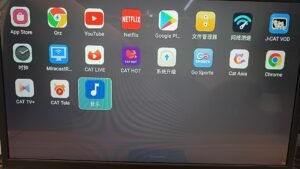
What About DIGIBOX Apps?
Because the DIGIBOX D6 MAX runs Android 12, apps play a major role in the experience. The DIGIBOX app environment can be used for different categories of entertainment and utility applications, depending on compatibility.
Before relying on one specific app, check:
- Is it compatible with D6 MAX?
- Is it available in your country?
- Does it require an account?
- Is it free or subscription-based?
- Does it have device-specific requirements?
This is more useful than assuming every Android app will work identically on every Android TV box.
Can You Use DIGIBOX in the USA and Canada?
Yes, users can definitely use the DIGIBOX TV BOX in the United States and Canada. The hardware can be used as an Android TV box in supported environments, provided you have a compatible television, power connection, and internet connection.
For online entertainment, your experience will depend heavily on your home network. The D6 MAX supports both dual-band Wi-Fi 6 and Gigabit Ethernet, giving users wireless and wired options. For apartments where the router is close to the television, Wi-Fi may be the simplest solution. For a fixed entertainment setup or frequent live streaming, Ethernet can be worth considering for more consistent local network performance.
DIGIBOX for Multilingual Families
A modern household doesn’t necessarily watch content in only one language. One family might want:
- English news
- Chinese dramas
- Kids’ educational content
- International movies
- YouTube
- Music
This is where an Android-based TV box can be particularly practical. Instead of buying separate devices for each type of content, users can access compatible apps from one entertainment system.
Is Everything on DIGIBOX Free?
Don’t confuse the cost of hardware with the cost of third-party services. Some apps may be free, but others may offer:
- Free tiers
- Advertising-supported content
- One-time purchases
- Monthly subscriptions
- Annual subscriptions
The fact that an app can be installed on an Android TV box doesn’t automatically make its paid content free. Always check the terms of the individual service.
Who Is the DIGIBOX D6 MAX Best For?
The D6 MAX makes the most sense for people who want more than a basic streaming stick.
- Live TV viewers
Users who value a TV-style entertainment setup and want strong networking options. - Movie and series fans
People who use multiple streaming and video applications. - Families
Households that need adult, kids, educational, and entertainment apps on one television. - Android users
People who prefer the flexibility of an Android-based entertainment device. - Users with local media
The multiple USB connections can be useful for compatible storage and accessories. - Users who care about network performance
Wi-Fi 6 plus Gigabit Ethernet provides flexibility for different home-network environments.
What Should You Check Before Buying DIGIBOX?
If you’re searching for DIGIBOX for sale, don’t choose a seller based only on the lowest price.
Check:
- Exact model
- Hardware specifications
- Plug type
- Warranty
- Return policy
- Shipping origin
- Customer support
- Product authenticity
- Current app information
Also make sure you’re actually buying the DIGIBOX D6 MAX if that’s the model you’ve researched. Different DIGIBOX generations shouldn’t automatically be assumed to have identical specifications.
DIGIBOX Content FAQ
The D6 MAX can be used with compatible apps and services for live content, movies, TV series, online video, kids’ content, music, sports services and other Android-based entertainment.
Yes, DIGIBOX has live TV channels, and the channel content can vary and shouldn’t be treated as a permanently fixed hardware specification.
The D6 MAX’s published specifications include H.265 4K @ 60fps decoding support. Actual playback resolution depends on the content, app, connection, and display.
Yes. Current specifications list dual-band Wi-Fi 6 (2.4GHz + 5.8GHz) and 2T2R antennas.
Yes, families can use compatible kids and educational apps, and DIGIBOX lists a Kids Lock feature on the D6 MAX.
The DIGIBOX itself is free, while some apps and services may need subscriptions. Third-party subscription services still require their respective accounts and plans.
Final Thoughts: DIGIBOX Is More Than a Channel List
When people ask “What can you watch on DIGIBOX D6 MAX?”, it’s tempting to answer with a huge list of channels. But that doesn’t give buyers the full picture.
The D6 MAX is an Android 12 TV box with 4GB RAM, 64GB storage, Wi-Fi 6, Gigabit Ethernet, and high-resolution video decoding capabilities. What makes it useful is the range of entertainment experiences it can support through compatible apps: live content, movies, TV series, YouTube and online video, sports services, kids’ entertainment, educational content, music, karaoke, and local media.
Instead of asking only: “How many DIGIBOX channels are there?”
A better buying question is: “Does the DIGIBOX D6 MAX hardware, app environment, connectivity, and support fit the way my household actually watches TV?”
That’s the question that will matter long after the first channel list you find online becomes outdated.
Ready to Get Your DIGIBOX D6 MAX?
If the DIGIBOX D6 MAX fits the way your household watches and enjoys entertainment, the next step is making sure you purchase a genuine DIGIBOX D6 MAX from a trusted seller.
Shop with us to get an authentic DIGIBOX D6 MAX with reliable shipping, warranty coverage, and dedicated after-sales customer support. Whether you need help before ordering, during setup, or after you start using your DIGIBOX, our support team is here to help.
Ready to upgrade your home entertainment? Visit our online store and order your genuine DIGIBOX D6 MAX today.