The DIGIBOX D6 MAX is positioned as an all-in-one Android TV box for international live television, on-demand entertainment and everyday streaming apps. This DIGIBOX D6 MAX review looks beyond the headline features to explain what it offers, who it suits and what buyers should verify before placing an order.

The DIGIBOX D6 MAX is worth considering if you want international live TV, VOD and a simple living-room interface in one device. The most important buying checks are the current channel lineup, regional availability, app support, internet requirements, content licensing and after-sales policy. Channel counts and availability can change over time.
What Is the DIGIBOX D6 MAX?
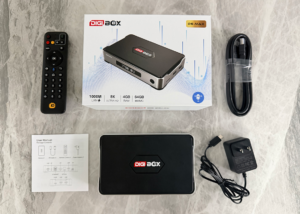
The DIGIBOX D6 MAX is an internet-connected Android TV box designed to turn a compatible television into a broader entertainment hub. Instead of relying on an antenna, satellite dish or traditional cable installation, it uses your home internet connection to deliver live channels, on-demand video and supported streaming applications.
That positioning makes it particularly appealing to international households, expatriates and multilingual families. A single television interface can bring together news, sports, movies, drama, variety shows and regional programming without requiring users to switch between several physical devices.
It is important to separate the hardware from the services used on it. The DIGIBOX is the device. Separate providers may control individual apps, channels, subscriptions, account requirements, and content rights and can vary by country.
Designed for international channels and multilingual households.
Combines scheduled channels with on-demand entertainment.
Uses a Bluetooth voice air mouse remote and a user-friendly interface.
DIGIBOX D6 MAX Review: Key Specifications
What Channels Can You Watch on the DIGIBOX D6 MAX?
The reference materials position the D6 MAX around a large global channel selection, with marketing claims of more than 2,000 live channels. Treat that number as a headline figure rather than a permanent guarantee. The actual lineup can depend on location, app version, network conditions, content rights, and service updates.
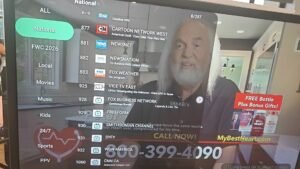
News and Current Affairs
News channels are one of the clearest reasons international users look at this type of TV box. A broad guide may include local, regional, and international news sources, allowing viewers to follow current events in multiple languages.
For important stories, it is sensible to compare multiple reputable news sources. A channel guide is a convenient access point, but it should not be treated as a substitute for evaluating the credibility or editorial position of each outlet.

Sports and Live Events
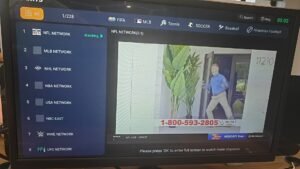
Sports is another major category, potentially covering football, basketball, tennis, motorsports, and other international events. The benefit is convenience, but sports rights are highly location-specific. A listed sports channel does not necessarily mean every event is available in every country.
For live viewing, a wired Ethernet connection is preferable when possible. A strong dual-band Wi-Fi connection can also work well, but congestion, distance from the router and other household traffic may affect playback.
Movies, Entertainment and Family Programming
Beyond news and sports, the channel experience may include movie channels, general entertainment, talk shows, variety programs, kids content and family programming. This variety is useful for shared households where different people want different types of content from the same television.
International and Regional Channels
The global focus is designed to serve viewers who want access to programming connected to their home country or culture. Depending on the current service lineup, users may find channels associated with North America, Europe, Asia, and other regions.
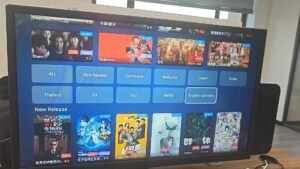
DIGIBOX D6 MAX APPS
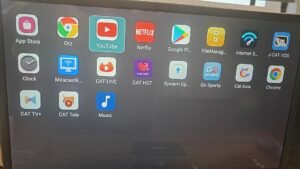
The app ecosystem is where the DIGI Box becomes more than a basic live TV receiver. The reference HTML highlights CAT LIVE, CAT TV Plus, J-CAT VOD, Go Sports, and CAT HOT, alongside familiar entertainment apps such as YouTube, Netflix, or Prime Video where supported by the device and service rules.
CAT LIVE & CAT TV Plus & CAT Tele
CAT LIVE, CAT TV Plus and CAT Tele are presented as the main gateways to live global channels. In practical terms, users should expect category-based navigation, a channel guide and playback controls designed for a television screen.
The value of this approach is organization. Instead of searching separately for every regional broadcaster, viewers can browse a unified interface. The trade-off is that channel availability and playback quality may change as services are updated.
J-CAT VOD
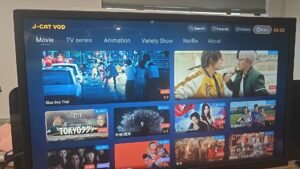
J-CAT VOD adds on-demand viewing, which means users are not tied to a fixed broadcast schedule. The reference materials describe categories such as movies, TV dramas, anime, variety shows and kids’ entertainment.
A well-organized VOD library can be especially convenient for families. Viewers can pause, resume and choose content when they have time. As with live channels, catalogue size, titles, subtitles, audio tracks and availability should be checked against the current offering.
CAT HOT
CAT HOT is a specialized adult 18+ streaming application designed for DIGIBox D6 MAX. It provides access to adult video content and live broadcasts, and typically requires a default security PIN or password (frequently 686868) to unlock.
Go Sports
Go Sports is a dedicated sports entertainment app designed for users who enjoy live sporting events and sports-related content. It provides a convenient way to browse available sports channels, follow live games, and enjoy sports programming directly from a TV-friendly interface. With remote control navigation and a large-screen viewing experience, Go Sports is designed for comfortable home entertainment.
Third-Party Apps
Popular apps can make an Android TV box more flexible, but compatibility matters. Some apps require an official certification, a separate account, or a paid subscription. Users should avoid assuming that the presence of the Android operating system automatically guarantees access to every service or the same video quality as a certified platform.
Set Up DIGIBOX D6 MAX
The basic setup is familiar. Connect the box to the television through HDMI, connect the power adapter, pair or point the remote, join a Wi-Fi network or plug in Ethernet, and complete the on-screen setup. The exact menus can differ by firmware version.
- Connect the DIGI BOX D6 MAX to an available HDMI port.
- Connect the power supply and turn on the television.
- Choose the correct HDMI input.
- Connect to Wi-Fi or Ethernet.
- Check system updates and sign in to any supported apps.
More details about installation >>> How to Set Up DIGIBOX D6 MAX
DIGIBOX D6 MAX: Pros and Limitations
Potential Advantages
- One device can combine live TV, VOD and compatible apps.
- The global focus can suit expatriates and multilingual households.
- A TV-first interface is convenient for shared family viewing.
- On-demand categories reduce reliance on fixed broadcast schedules.
- Ethernet support gives users a reliable wired-network option.
Potential Limitations
- Channel lists and content access can change by region and licensing.
- Large channel or VOD counts do not guarantee that every desired title is available.
- Some third-party apps may require separate subscriptions or accounts.
- Streaming quality depends heavily on the home network.
- Buyers should verify firmware support, legal availability, and after-sales service.
Is the DIGIBOX D6 MAX Worth Buying?
For a household that values international live channels, VOD categories, and a single remote-controlled interface, the D6 MAX can be an appealing alternative to managing several separate devices.
It is a stronger fit for overseas families, multilingual homes, viewers who miss regional programming, and users who prefer a television-based experience over watching everything on a phone or laptop.
If you want to compare with other Android TV boxes, go to DIGIBOX VS UBOX.
Frequently Asked Questions
What is the DIGIBOX D6 MAX?
The DIGIBOX D6 MAX is an internet-connected Android TV box designed to bring live TV, VOD and compatible entertainment apps to a television.
How many channels does the DIGIBOX D6 MAX offer?
The supplied reference materials market the device with more than 2,000 live channels. The actual lineup may vary by region, app version, service availability, and licensing.
Does the DIGIBOX D6 MAX require a monthly subscription?
The device is positioned around a one-time hardware purchase and may include core services without a recurring monthly fee. Separate third-party apps, subscriptions or purchases can still apply.
Can I watch Netflix and YouTube on the DIGIBOX D6 MAX?
Compatibility can depend on the device version, app certification, firmware and the service’s own requirements. Verify current support before buying rather than assuming every Android app will work identically.
Is the DIGIBOX D6 MAX legal to use?
The legality of a specific channel or programme depends on content rights and local law. Use legitimate services, respect regional restrictions, and verify the source of any third-party application or stream.