Type “what is DIGIBOX” into Google and you’ll get dozens of answers that mostly sound the same. The problem is that most of them skip the questions you actually need answered before buying: what the hardware actually does, what setting it up really looks like, and — crucially for anyone shopping online — how you tell a genuine DIGIBOX seller from a fake one.
This guide covers all three. If you’re new to Android TV boxes, we’ll explain what DIGIBOX is in plain terms. If you’re already interested, we’ll walk through the current model’s capabilities and setup at a high level. And by the end, you’ll have a practical checklist for buying from an authorized seller — with our own authorization details so you can verify us before you spend a dollar.

What is DIGIBOX?
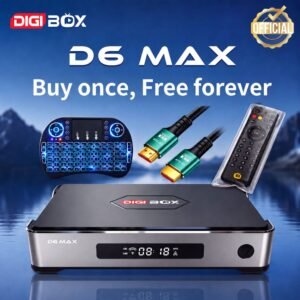
DIGIBOX is a brand of Android-based TV boxes — small compact devices that plug into your television via HDMI and turn any regular TV into a smart TV. The current flagship model is the DIGIBOX D6 MAX, running Android 12 on hardware designed for smooth everyday streaming, browsing, and app use.
The simplest mental model: think of it as an Android tablet, but for your big screen. You connect it, join Wi-Fi, install compatible apps from supported sources (like the Google Play Store), and use them the same way you’d use apps on a phone. Whatever you watch depends on the apps you install, the services you’re entitled to use, and the licensing that applies where you live — exactly as on any Android device.
A few things it’s not, since these come up often:
- It’s not a cable subscription. There’s no monthly fee from us. Any streaming services you subscribe to separately are billed by those providers.
- It’s not a “channel package”. Content is delivered through the apps you install, not baked into the box.
- It’s not a Fire Stick or Chromecast. Those are stripped-down streaming sticks tied to specific ecosystems. DIGIBOX is a full Android box with local storage, a real remote, and more open app compatibility.
DIGIBOX D6 MAX: Core Functions & Must-Know Specs
Instead of a spec dump, here’s what each number means for daily use:
| Spec | What it is | What it means for you |
|---|---|---|
| System | Android 12 | A familiar, current Android environment for compatible TV apps |
| Processor | Quad-core ARM Cortex-A53 + Mali-G31 MP2 GPU | Responsive menus, smooth 4K video decoding |
| Memory | 4GB DDR3 RAM | Comfortable switching between apps without stalls |
| Storage | 64GB eMMC | Built-in space for the system and compatible apps |
| Network | Dual-band Wi-Fi 6 + Gigabit Ethernet | Fast wireless when you need it, wired for rock-solid streaming |
| Bluetooth | Bluetooth 5.4 | Connects to compatible audio, keyboards, and other accessories |
| Video | H.265, 4K@60fps, 8K@24fps | Future-proof decoding for whatever your TV supports |
| Remote | Bluetooth Voice Air Mouse remote (backlit, TV learning) | Voice search, motion pointer, backlit keys — genuinely one of the better remotes in this category |
Everything above is according to current DIGIBOX D6 MAX product specifications. Actual playback and picture quality depend on the source file, the app, your television, the HDMI connection, and network conditions. No specific channel, subscription, sports event, movie library, or third-party service is promised with the hardware — the box does what an Android device does; the apps do the watching.
What the D6 Max Is Designed to Do — and What It Isn’t
What it does
✓ Runs compatible Android apps on your TV
✓ Streams via installed apps you choose
✓ Voice search across supported apps
✓ Plays personal media and content on the big screen
✓ Connects Bluetooth accessories
What it doesn’t do
✗ Include paid subscriptions
✗ Guarantee any specific app or content
✗ Bypass regional or licensing restrictions
✗ Come with a “channel package”
✗ Charge monthly fees from us
Setting DIGIBOX D6 MAX Up
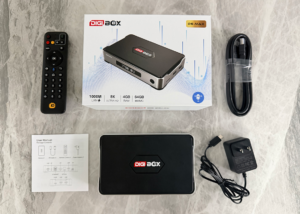
You’ve unboxed the DIGIBOX D6 MAX. What next? The setup itself is short — most people are up and running in about 30 minutes. Here’s the roadmap:
1. Connect the DIGIBOX to your TV using the HDMI cable.
2. Plug in the USB-C power adapter.
3. Switch your TV to the correct HDMI input.
4. Insert batteries into the Bluetooth voice remote and pair it.
5. Choose a language and connect to Wi-Fi (or use Ethernet for the most stable connection).
6. Let the box complete any first-run system update, then install compatible apps.
For the complete walkthrough, including every step, timing, and how to handle the small hiccups that catch first-time users, see our detailed DIGIBOX D6 MAX setup guide.
Purchase From an Officially Authorized Seller
This is where a lot of “what is DIGIBOX” articles stop being useful. They tell you what the box is, then leave you on your own to buy it — despite the fact that the DIGIBOX marketplace has a well-documented problem with counterfeits, grey-market imports, and unauthorized sellers.
Here’s the reality: whether you get a good DIGIBOX experience depends almost entirely on where you buy it. A genuine unit from an authorized seller lasts for years, has real warranty backing, and comes with support that speaks your language. A fake or grey-market unit — even at 40% less — often fails within months, has no warranty, and leaves you talking to nobody.
Why the seller matters more than the price
DIGIBOX doesn’t put a consumer-facing anti-counterfeit sticker on the hardware itself — you can’t tell a real one from a fake one by looking at the box. What you can verify is the seller’s authorization. That’s the actual proof of authenticity in this market.
Here’s what an authorized seller gives you that an unauthorized one can’t:
- An authorization code you can independently verify on the official DIGIBOX website (more on ours below).
- Genuine hardware from the factory, not a repackaged clone.
- The correct plug type for your country — grey-market imports often arrive with the wrong plug.
- Real warranty coverage, honoured by an actual company you can contact.
- Support in your language from someone reachable when things go wrong.
- Ongoing firmware updates — some grey-market units are cut off from official OTA updates.
Our authorization — verify us before you buy
✅ We are an authorized DIGIBOX seller
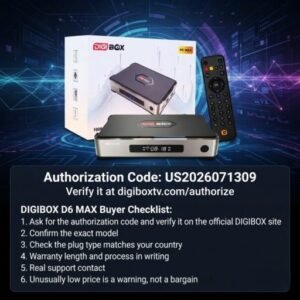
Our authorization code: US2026071309
Verify it independently at the official DIGIBOX authorization page:
Enter the code above on the official verification page. If it doesn’t check out, don’t buy from us. We’d rather you verify than take our word for it.

That’s the whole point of asking for verification — you shouldn’t have to trust anyone’s marketing. You should check.
The pre-purchase checklist
Whether you buy from us or someone else, run through these six checks before paying:
- Ask for the authorization code and verify it on the official DIGIBOX site. If they can’t produce one, walk away.
- Confirm the exact model — “DIGIBOX D6 MAX”, not “latest model” or “2025 version” without a specific name.
- Check the plug type matches your country. A US buyer getting a UK plug is a red flag.
- Warranty length and process in writing. How long? Who handles a claim? What’s the return window?
- A real support contact — a phone number, email, or WhatsApp that gets answered by an actual person.
- An unusually low price is a warning, not a bargain. A DIGIBOX D6 MAX priced 40–50% below normal is rarely legitimate.
The four warning signs of an unauthorized seller
- 🚩 Can’t produce an authorization code, or the code doesn’t verify.
- 🚩 Promises unlimited paid content forever, or lists specific premium subscriptions “included” — nobody legitimate can deliver that.
- 🚩 No warranty details or vague “supplier handles it” answers.
- 🚩 Suspiciously low price combined with any of the above.
Is DIGIBOX D6 MAX Right for You?
Given everything above, DIGIBOX D6 MAX makes sense for:
- Households that want more than a Fire Stick — proper local storage, wired Ethernet, a real remote, and open Android app compatibility.
- People who prefer to pay once — no monthly fee from us; you use whichever apps and subscriptions you already have or want.
- Multi-generational families — the clean interface and voice remote make it easier for less tech-confident users to operate.
- Anyone upgrading from an older Android box — Wi-Fi 6, Gigabit Ethernet and 8K decoding are meaningful step-ups.
It’s probably not for you if you’re already deep into a single ecosystem (Apple TV, Chromecast with Google TV built into your existing devices), and the box would be redundant.
Quick Answers
What is DIGIBOX in one sentence?
DIGIBOX is a brand of Android-based TV boxes that plug into your TV via HDMI and turn any television into a smart TV — you install compatible apps and use them like you would on an Android phone.
Does DIGIBOX require a subscription?
There’s no monthly fee from us — DIGIBOX is a one-time hardware purchase. Any streaming services you subscribe to separately are billed by those providers, not by us.
How do I know I’m buying a real DIGIBOX?
Ask for the seller’s DIGIBOX authorization code and verify it independently at digiboxtv.com/authorize. Our code is US2026071309 — check us the same way you’d check anyone else.
What’s the difference between DIGIBOX and a Fire TV Stick?
DIGIBOX D6 MAX is a full Android TV box with 4GB RAM, 64GB storage, Gigabit Ethernet, and a proper remote with voice search. A Fire Stick is a smaller streaming stick tied more tightly to Amazon’s ecosystem, with less local storage and no wired option.
How long does DIGIBOX setup take?
About 30 minutes for a first-time user, from unboxing to first show. Detailed walkthrough in our DIGIBOX D6 MAX setup guide.
Is Ethernet or Wi-Fi better for DIGIBOX?
Ethernet is more stable and eliminates most buffering. Wi-Fi 6 works well when Ethernet isn’t practical. If your router is close enough, wired is worth the effort.
Ready to Buy?
You’ve read the guide, you know what DIGIBOX is, you know how to spot a real seller from a fake one. If you want to see the current DIGIBOX D6 MAX product page, price, and package contents, visit our DIGIBOX D6 MAX product page. For deeper reading on the model itself, see our DIGIBOX D6 MAX review.